This is incredible and I’m already thinking about how I can apply this to areas of learning and real time teamwork and collaboration elevates the use of Delightex in Play mode so much! Very exciting.
I’m wondering if it’s possible to Remix a previous project that is not Multiplayer to turn it into a Multiplayer game?
Hi @Ezra_Garcia It’s only possible to create sessions on PC for now but you can join multiplayer sessions on all devices (though currently it’s still not available in VR).
Hi @Jens_Tiburski1 There’s no chat window for the moment, but it’s a nice idea and your feedback has been passed on! Yes, the hotkey for opening the emote wheel is “E”
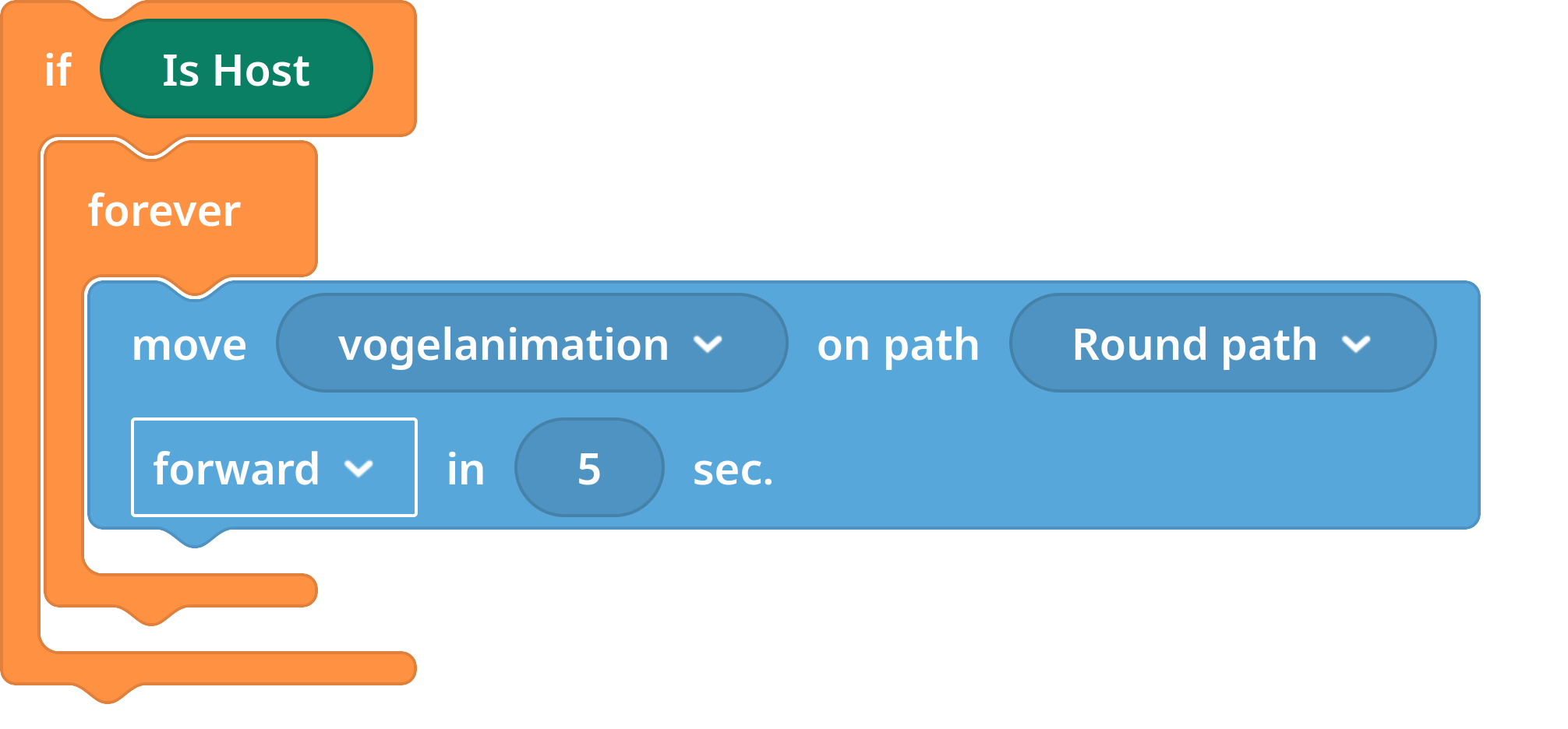
When a second player joins my multi-player world, the bird’s path animation at the bird feeder disappears, along with the bird itself… (Delightex Edu :: Winterwald MultiPlayer)
No problem! I’ve started creating a new project to test it out - but it seems like my character is glitching in Play mode, my arrow controls are opposites and I can’t scroll in closer or move my view with click and drag. I tried troubleshooting by remixing one of the new multiplayer games from the gallery and all controls are working as expected in that. Any advice before I keep building?
Fantastic feature! One small issue I have found (on desktop anyway) is that if you have an information pop-up block, it disables the ability to move the camera around after it has appeared and this remains even after you click out of the box.
Hope this can get fixed as want to make a gallery for my students to upload their works into.
Hi @Jens_Tiburski1 That’s because CoBlocks scripts execute on every client. When the second player joins, their script starts pushing the same object along path which creates conflict and undefined behaviour.
Hi @Mr_Lang This is likely happening because one event handler can overwrite another.
If you have multiple event blocks of the same type attached to the Camera, the later one may override the earlier one, which can lead to unexpected behavior like movement not restoring after an information pop-up.
The best fix is to use a single event handler and put your checks inside it with conditional logic, rather than using multiple separate event blocks for the same event type.
That should help avoid the issue and make gallery-style projects work more reliably. Hope this helps!




 This is likely happening because one event handler can overwrite another.